



7 min read
Bluekit Phishing-as-a-Service: Browser-in-the-Middle, Evolved

Executive summary
Netcraft has identified and is actively detecting live deployments of Bluekit, a sophisticated Phishing-as-a-Service (PhaaS) platform that introduces a meaningful shift in how adversary-in-the-middle (AitM) phishing is executed. While Bluekit was first documented by Varonis Threat Labs — who assessed at the time that it appeared to still be in development — Netcraft can confirm the platform is now operational at scale, with approximately 70 hostnames detected in the last week.
Bluekit's distinguishing capability is its Browser-in-the-Middle (BitM) technique, implemented via rrweb, an open-source library that records and streams live DOM interactions. Rather than proxying web traffic between victim and target site (as tools like Evilginx do), Bluekit loads the legitimate login page inside an attacker-controlled browser and streams what the victim sees and interacts with in real time. The result is that victims log into their accounts on the attacker's machine, not their own.
The platform also deploys a layered evasion architecture designed to prevent automated detection: dynamic JavaScript obfuscation, a custom CAPTCHA that impersonates target brands or legitimate anti-bot services, WebRTC-based IP mismatch detection, headless browser fingerprinting, and randomized HTML on every page load. These measures are intended to make Bluekit harder to detect and block than conventional phishing kits.
This report details Bluekit's technical operation, its divergence from traditional AitM tooling, and signals that security, intelligence, and business leaders can use to understand and respond to this threat.
How Bluekit works: A technical overview
Bluekit operates in two distinct phases: a pre-engagement evasion phase designed to distinguish human victims from automated scanners, and a delivery phase in which the BitM technique is executed.
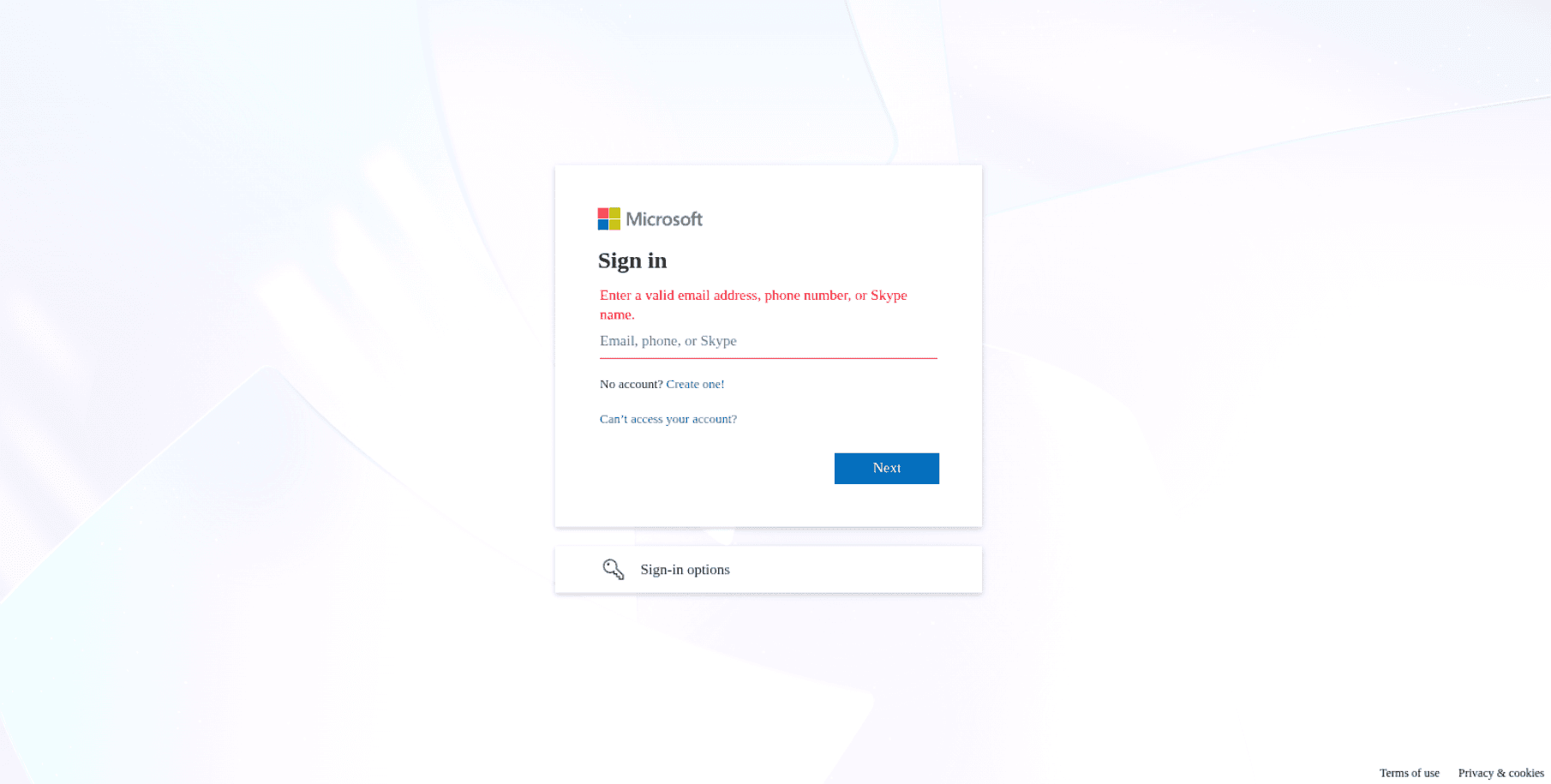
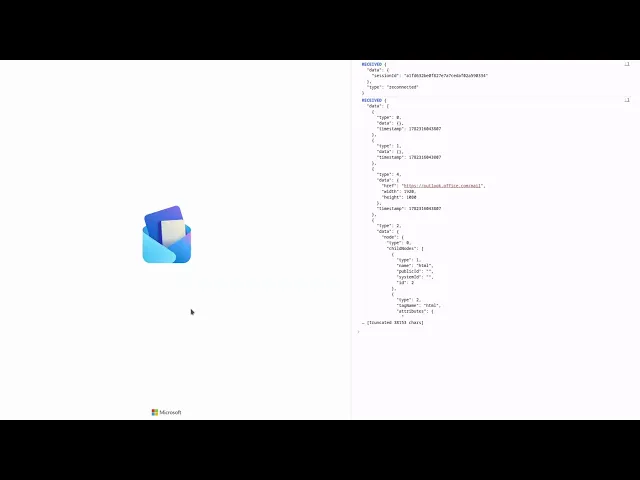
Figure 1. A Microsoft login page rendered inside a live Bluekit deployment. The DOM has been loaded in the attacker's browser and streamed to the victim via rrweb. To the victim, the page content is visually indistinguishable from a legitimate Microsoft login page.
Phase 1: Anti-analysis and victim qualification
Before any phishing content is shown, Bluekit subjects every visitor to a check designed to determine whether they are a real victim or an automated scanner. Key mechanisms include:
CSS filter manipulation: Randomized filter values are applied to the top-level HTML element (saturation, hue, brightness, contrast) on every page visit to defeat screenshot pixel-hash detection.
JavaScript obfuscation: The primary script file exceeds 1MB and is periodically rotated, defeating static signature-based blocking.
Custom CAPTCHA: Rather than embedding a standard Google or Cloudflare CAPTCHA, Bluekit renders its own, sometimes styled to impersonate the target brand, sometimes styled as legitimate anti-bot services. The CAPTCHA page HTML is different on each page load.
Fingerprinting: Visitor characteristics assessed include installed RAM, CPU count, browser language settings, screen resolution, headless browser indicators, and the presence of anti-fingerprinting browser extensions.
WebRTC IP mismatch detection: to discover the user's public IP address, WebRTC connects to a STUN server over UDP, which returns its view of the user's public IP address. If the browser is configured to only route TCP traffic through a proxy server or VPN, the public IP address observed by the attacker will not match the IP address returned by the STUN server; a strong indicator of automated scanner or analyst activity.
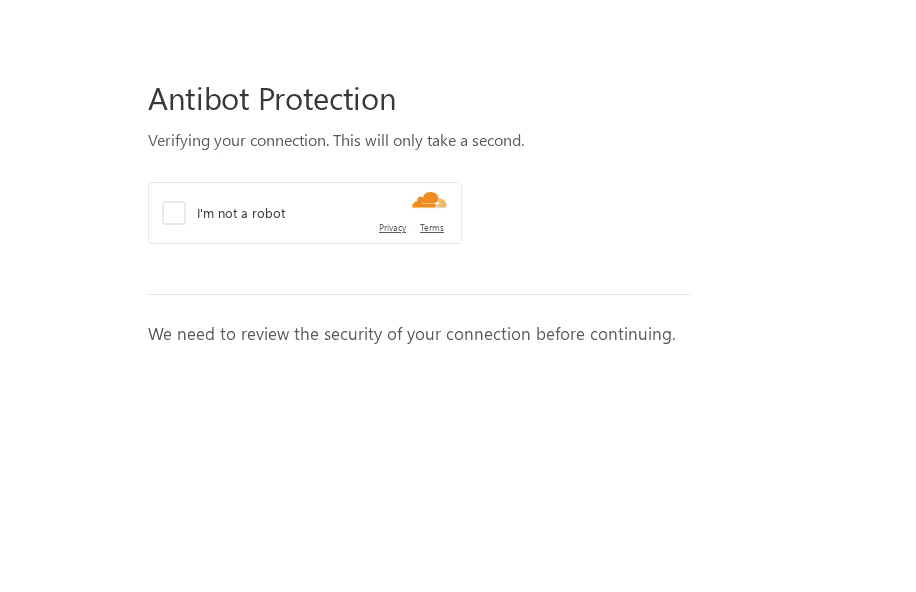
Figure 2. An example of Bluekit's custom CAPTCHAs, in this case impersonating Cloudflare. The HTML structure is randomized on every visit to defeat hash-based detection systems.
ANALYST NOTEThe WebRTC IP mismatch technique exploits a documented browser behavior in which WebRTC can surface the true IP address of a browser when behind a proxy in some cases. Security teams running automated phishing analysis should ensure browser environments and proxies are configured to avoid inadvertent analyst IP exposure during kit evaluation. |
Phase 2: The Browser-in-the-Middle (BitM) delivery
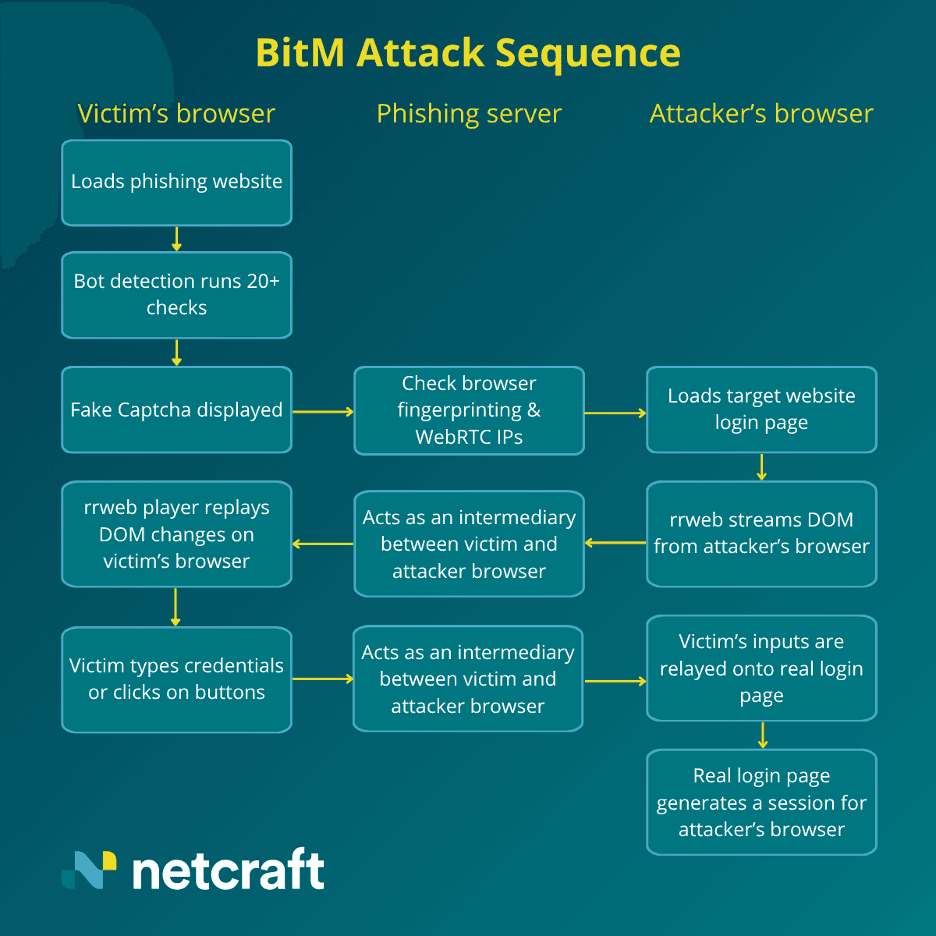
After visitors pass all anti-analysis checks, Bluekit loads the legitimate target website inside an attacker-controlled browser and streams what that browser renders to the victim in real time. The mechanism is built on rrweb, an open-source JavaScript library used for session replay, repurposed here as a covert phishing delivery channel.
The sequence of events:
The attacker's infrastructure opens the legitimate target login page (e.g., Microsoft) in a browser it controls.
Using rrweb, the live DOM of that page is serialized and streamed to the victim's browser over a WebSocket connection.
The victim's browser renders the DOM natively, not as a screenshot or video, but as a real, interactive webpage.
Page assets (images, fonts, stylesheets) not included in the DOM stream are fetched via a proxy API endpoint on the PhaaS infrastructure. This way requests do not go directly to the legitimate site from the victim's machine.
The victim's mouse movements and keystrokes are captured and relayed back to the attacker's browser, which executes them on the legitimate site.
The victim completes what appears to be a normal login flow but in reality, they have authenticated into the attacker's browser session on the attacker’s browser.
Live operator visibility: The admin panel
Bluekit's administration panel includes a real-time view of victim interactions, likely powered by the same rrweb infrastructure used for delivery. Demonstrations shared on Telegram show a live “screenshot” of the victim's point of view as they navigate the phishing page, allowing operators to monitor phishing as it happens, as well as what the victim does post-login.
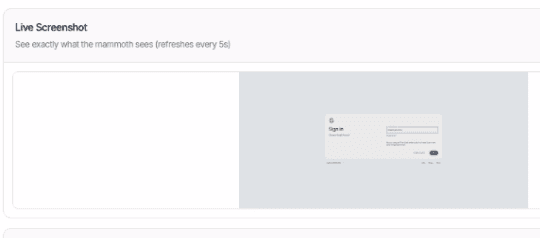
Figure 3. Bluekit's administration panel showing real-time victim session monitoring. This view allows operators to observe login flows as they occur.
How Bluekit differs from traditional AitM tooling
AitM phishing is not a new concept. Platforms such as Evilginx have provided reverse-proxy-based credentials and session theft for years. Bluekit's architecture represents a meaningful departure from that model, with distinct operational trade-offs.
Characteristic | Evilginx (Reverse Proxy) | Bluekit (BitM) |
Browser execution context | Victim’s local browser | Remote attacker-controlled browser streamed to victim |
Credential/session theft method | Intercepts traffic in transit | Victim authenticates in attacker's browser directly |
MFA bypass | Yes | Yes |
Resource requirements | Lightweight | Higher: full or headless browser required |
Attacker detection exposure | Low | Higher: attacker's browser subject to target site fingerprinting |
Live operator requirement | Not required | Not required; panel enables optional monitoring |
Evasion sophistication | Moderate–high (depends on operator sophistication) | High (inherits real browser behavior + dynamic evasion) |
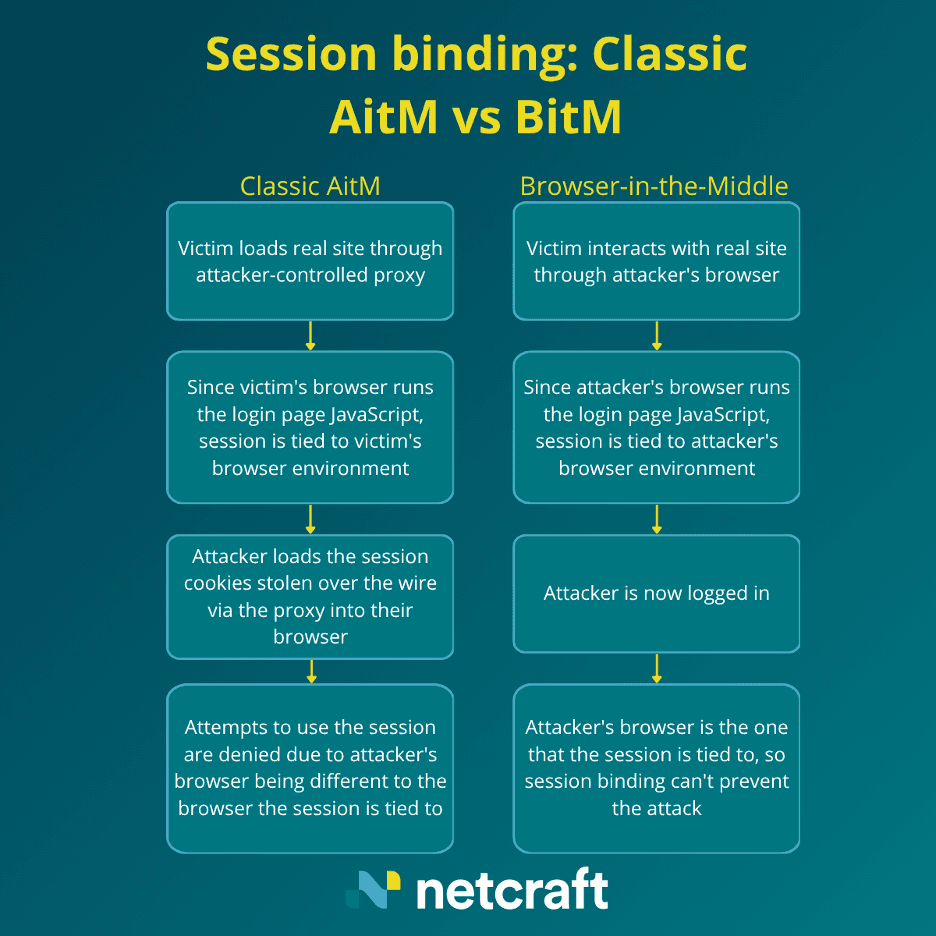
Session ownership | Victim session hijacked post-authentication: browser fingerprint mismatch can expose the theft | Attacker owns session from the start; browser environment is consistent throughout, reducing detection signals |
One structural trade-off warrants particular attention: The attacker's browser that executes the actual login is itself subject to the fingerprinting and bot-detection deployed by the target site. An attacker whose browser appears anomalous to the target's risk engine may trigger account lockouts or additional authentication challenges. This is a structural cost that may inform how defenders can raise friction for Bluekit operators at the target site level.
On the other hand, the attacker’s browser executing the login and JavaScript means that it will tell a consistent story throughout. In Evilginx, where the stolen session is later loaded into a different browser environment, a fingerprint mismatch between the victim's browser and the attacker's browser creates a signal that detection systems can exploit. With Bluekit, the session is created and used in the same browser from the start, leaving no such signal. Technologies such as Device Bound Session Credentials (DBSC) cannot protect against Browser-in-the-Middle, while they do provide some protection against Adversary-in-the-Middle.
Why rrweb? The engineering logic behind BitM
Browser-in-the-Middle attacks have been theorized in security research for years. Historically, proposed implementations involved streaming a live remote desktop — essentially screen capture — from the attacker's machine to the victim's browser. Bluekit's use of rrweb is more sophisticated.
Where a remote desktop stream sends pixels, rrweb sends DOM events. The victim's browser receives the serialized structure of the page (form fields, buttons, styling) and renders it natively. This design avoids the cost and detectability of pixel-based remote desktop streaming, making BitM practical at scale. The following are the key distinctions:
Visual fidelity: The rendered output is a real web page, not a recording of one. There are no compression artefacts, no framerate limitations, and no perceptible quality degradation compared to the legitimate page.
Interactivity: Because the DOM is live, form elements behave as expected. The victim experiences a real login flow.
Bandwidth efficiency: Streaming DOM events over a WebSocket is substantially lighter than video, reducing infrastructure load and latency.
Latency as a detection signal: Despite rrweb's efficiency, the BitM architecture introduces additional round-trip latency that’s not usually present on legitimate pages. Victims may perceive the page as marginally less responsive to keyboard input and mouse clicks.
INTEL CONTEXT rrweb (github.com/rrweb-io/rrweb) is a legitimate, actively maintained open-source project widely used in product analytics and user research tooling. Its use by Bluekit follows a consistent pattern of threat actors weaponizing developer infrastructure to gain legitimacy and evade reputation-based controls. The presence of rrweb in a web environment is not in itself an indicator of compromise; context is required. |
Indicators and observable signals
The following observable signals are associated with Bluekit deployments based on Netcraft's analysis of live campaigns. These are investigative signals, not binary indicators of compromise.
Observable Signal | Stage | Notes |
CSS filter manipulation on top-level HTML element with randomized values | Anti-analysis | No two screenshots are identical; defeats pixel hash detection |
Obfuscated JavaScript bundle >1MB, periodically rotated | Anti-analysis | Cannot be blocked reliably by static hash |
Custom CAPTCHA (not Google / Cloudflare native) | Victim qualification | May impersonate styling of target brand or legitimate anti-bot services |
WebRTC IP mismatch detection on landing page | Analyst detection | Attempts to surface real visitor IP to detect use of a proxy or VPN |
Browser fingerprint checks (RAM, CPU, headless browser, screen resolution) | Bot detection | Consistent with automated scanner evasion architecture |
WebSocket connection sending encrypted or binary data on login page | BitM delivery | rrweb DOM stream in transit to victim browser |
Proxy API endpoint handling asset (image/font/CSS) fetching | BitM delivery | Assets not loaded directly from legitimate target site |
rrweb library present outside known product analytics context | BitM delivery | Core delivery mechanism for DOM streaming |
This report was produced by Netcraft Threat Intelligence. Netcraft detects and disrupts phishing, fraud infrastructure, and digital risk at scale, with a 29-year track record and a network spanning 1,700+ hosting providers. For enquiries, visit netcraft.com.