




Netcraft has uncovered activity abusing Padlet and Scribe, online writing and collaboration tools, to host secure document lures. The pages present recipients with familiar document notifications, often claiming that a secure, shared, or scanned file is waiting to be viewed, before directing them toward attacker-controlled infrastructure.
Both services have legitimate business uses, but the same publishing functionality also provides attackers with a ready-made page on a trusted domain.
Separately, Netcraft identified a cluster of fake document-access pages using the heading “Secure Access Utility Required.” Instead of immediately presenting a credential-harvesting page, these sites prompt visitors to download and install software to open the document.
Secure document lures on Padlet and Scribe
Using secure document terminology to conduct searches, Netcraft identified the first cluster with a recurring title “You have received a new secure document.” One example used QuickBooks branding and was hosted on Padlet at hxxps://padlet[.]com/quickbook098/you-have-received-a-new-secure-document-9wzjhozsa3m5q31p.
The pages were not crude copies of login portals and instead resembled document delivery notifications. These pages included the message, “this message is encrypted to protect your sensitive data during transmission.” A blurred document preview was displayed below the message. The example appeared to contain remittance advice, followed by “Total Pages: 02_Scanned/PDF_Files” and a link labeled “VIEW ALL DOCUMENTS HERE.”
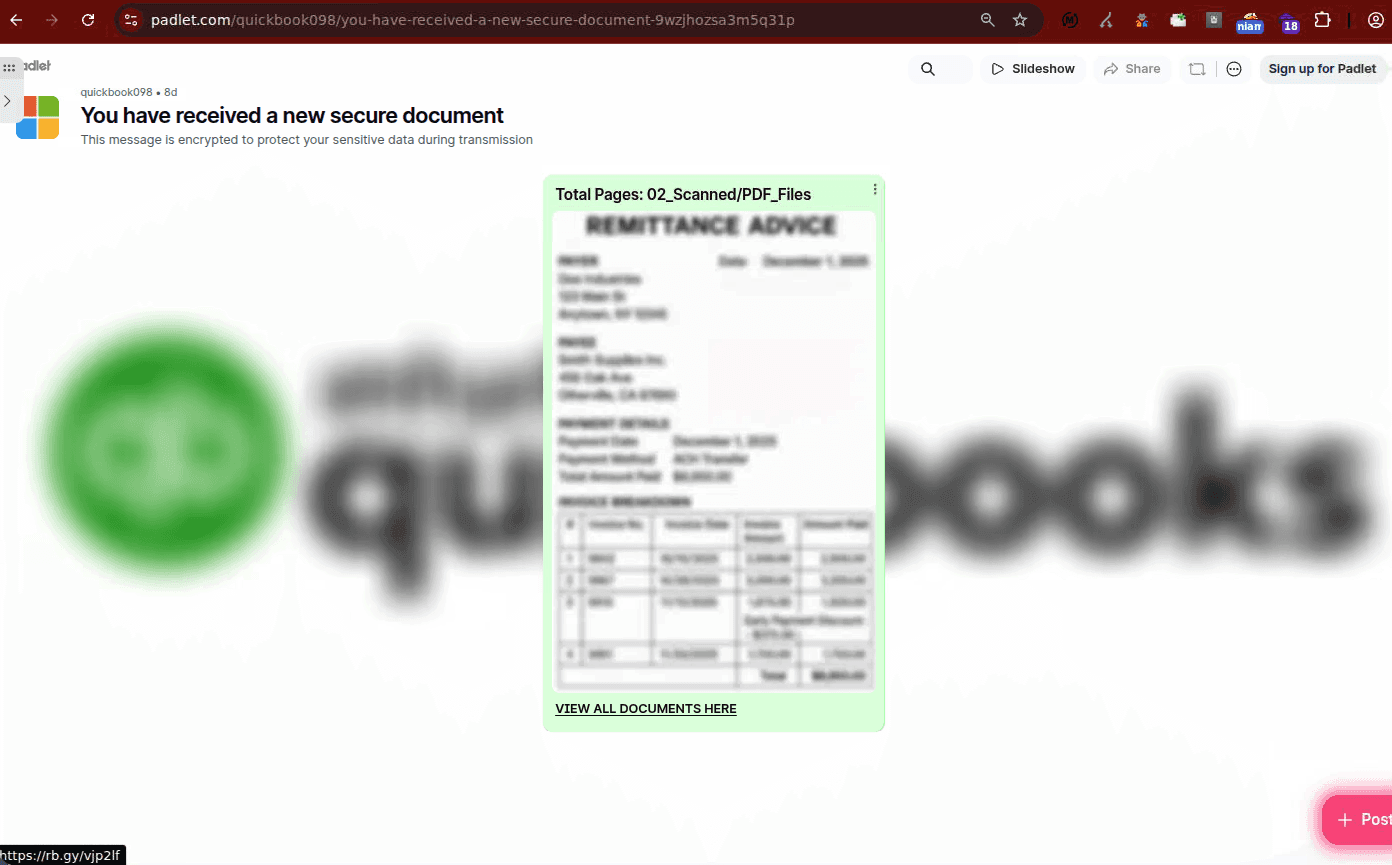
A fake secure document lure hosted on Padlet.
The rendered page used the blurred document as a lure to get the user to click. Enough content is visible to make the file appear real, but not enough for the visitor to read the supposed document without continuing.

Blurred document preview used as part of the lure.
The more commonly seen Padlet page followed the same pattern but displayed a document using branding from insurance company State Farm and claimed that five scanned PDF pages were available.
The related Padlet URLs included:
hxxps://padlet[.]com/alex1coffey/you-have-received-a-new-secure-document-rjk7tw497odiz5m
hxxps://padlet[.]com/alex1coffey/you-have-received-a-new-secure-document-rjk7tw497odiz5m/wish/jpoxajko2Aq7QbPE
hxxps://padlet[.]com/alex1coffey/you-have-received-a-new-secure-document-upel9lc0u3q267fu
hxxps://padlet[.]com/quickbook098/you-have-received-a-new-secure-document-9wzjhozsa3m5q31p
Some of the observed pages linked to shortened URLs such as:
hxxps://rb[.]gy/kf04ab
hxxps://jz[.]rs/tAXUUwQgg
At the time of writing, several of these redirects now read that they are suspended.
Following the redirect chain
The malicious activity becomes clearer when the outbound links are followed.In one example, selecting “VIEW ALL DOCUMENTS HERE” led to hxxps://rb[.]gy/vjp2lf. The shortened URL then passed through a SendGrid click-tracking hostname before reaching attacker-controlled infrastructure at hxxps://dnewt[.]ct[.]ws/ and then hxxps://aouth-cache-rnicosoft-uid[.]vercel[.]app/.
Further redirection led through hxxps://utn[.]pl/newstats before reaching hxxps://aouth-cache-newrnicosoft-uid[.]netlify[.]app/. The Netlify page, in turn, contained a downstream destination pointing to hxxps://aouth-cache[.]rnicosoft-uid[.]workers[.]dev.
The chain looked like this:
Padlet lure → rb[.]gy → SendGrid click tracking → dnewt[.]ct[.]ws → Vercel-hosted redirector → utn[.]pl/newstats → Netlify-hosted gate → Cloudflare Workers destination
Several services in that chain are legitimate infrastructure providers and should not be treated as malicious in their entirety.
Recipient data carried through the chain
The JavaScript on dnewt[.]ct[.]ws contains explicit logic for handling victim email addresses. The page examines the portion of the URL after the # fragment and checks whether the value is a valid email address or Base64-encoded data that decodes to an email address.
If the value passes either check, it is appended to the next-stage URL which is hosted on Vercel, a platform for building, deploying, and hosting web applications, as a fragment such as hxxps://aouth-cache-rnicosoft-uid[.]vercel[.]app/#[email protected].
If it does not pass validation, the script substitutes #invalid_email. The same logic appears again at the Vercel stage, which reads the fragment and forwards it to the next destination. This is likely built to preserve a recipient identifier across several stages of the redirect chain.
Using URL fragments has operational advantages. Fragment values are processed in the browser and are not normally sent to the web server as part of the HTTP request. JavaScript can still read them and deliberately pass them onward. This means the recipient address can travel through the client-side flow without always appearing in the same place as a conventional email= query parameter.
Browser verification at dnewt[.]ct[.]ws
The first response from dnewt[.]ct[.]ws does not immediately perform the campaign redirect.
Instead, the server returns JavaScript that loads aes.js, performs an AES decryption operation and sets a cookie named __test. The browser is then redirected back to the same site with ?i=1.
Only after this step does the second response perform the victim-email processing and redirect to the Vercel infrastructure. Once past that stage, the page contains JavaScript that again reads the victim identifier from the URL fragment and redirects to hxxps://utn[.]pl/newstats.
Explicit anti-scanner logic on the Netlify stage
The clearest anti-analysis behavior appears on aouth-cache-newrnicosoft-uid[.]netlify[.]app. The page source is wrapped inside a large document.write(unescape('...')) block, with the underlying HTML and JavaScript represented as a hexadecimal escape sequence.
Once decoded, the script contains a large user-agent blocklist covering search engines, monitoring tools, security products, and automated scanners. The following are present in the list:
Googlebot
Bingbot
Yandexbot
Baiduspider
Semrushbot
Ahrefsbot
Datadog
NewRelicPinger
WebPageTest
Pingdom
StatusCake
Lighthouse
Antivirus
NetcraftSurveyAgent
One entry is particularly relevant: NetcraftSurveyAgent. The inclusion appears intended to prevent Netcraft from accessing the malicious content by redirecting matching visitors to about:blank. However, this method is ineffective against Netcraft’s site collection.
Repeated Microsoft-like naming
The infrastructure also shows a consistent subdomain naming convention:
aouth-cache-rnicosoft-uid
aouth-cache-newrnicosoft-uid
aouth-cache[.]newrnicosoft-uid
Several patterns are seen, including the use of “aouth” (almost certainly intended to reference oauth), “cache”, “rnicosoft”, which uses a basic homoglyph technique, and “uid”.
Similar abuse on Scribe
Netcraft also found document-themed phishing hosted on Scribe, a legitimate service designed to create and share visual, step-by-step guides. This makes it a useful platform for attackers for much the same reason as Padlet, as the page itself sits on an established domain while the content can be created by individual users and used to direct visitors elsewhere.
In the examples Netcraft reviewed, Scribe was not necessarily being used to host the final credential harvesting or malware. Instead, it acted as an intermediate stage in the chain, a place where victims are shown a convincing document notification or a set of instructions before being directed to external infrastructure.
For a recipient, a link hosted on Scribe may look considerably less suspicious than an unfamiliar domain registered days earlier. For an attacker, that provides a convenient first-stage landing page without having to establish any reputation of their own.
Examples Netcraft identified include:
scribehow[.]com/o/ctlM-GJWSKGShgUAdeGF_w/page/You_Have_Received_A_New_Secure_Document_Via_Docusign__VAtHttzySOiqRSO0a9nHuw
scribehow[.]com/page/You_Have_Received_A_New_Secure_Document_Via_Docusign__VAtHttzySOiqRSO0a9nHuw
Fake DocSend “Secure Access Utility” campaign
The second set of activity Netcraft identified took the document access pretext further. Rather than simply presenting a fake document and asking the victim to sign in, these pages tell the visitor that they need to install software before the document can be opened.
The page is headed “Secure Access Utility Required” and underneath the visitor is told “Please follow the instructions below,” followed by a “Download File” button.

The page tells the visitor to download the installer, run the installer, return to the open document once installation completes, and open the downloaded document.
At the bottom of the page, the lure adds several security-themed assurances such as “Secure Transfer,” “Verified Access,” “Integrity Checked,” and “Activity Logs.” The page is designed to make software installation feel like a normal part of accessing a protected document.
The reference to DocSend is central to the lure. Victims are told that once installation is complete, they should return to the document on DocSend and download it. This positions the fake “Secure Access Utility” as if it were a normal prerequisite for accessing a DocSend-hosted file. There is no indication that this utility is a legitimate DocSend product or that DocSend is involved in distributing it.
The reference to DocSend is central to the lure. Victims are told that once installation is complete, they should return to the document on DocSend and download it. This positions the fake “Secure Access Utility” as if it were a normal prerequisite for accessing a DocSend-hosted file. There is no indication that this utility is a legitimate DocSend product or that DocSend is involved in distributing it.
Visually, the page does not closely copy DocSend itself. It uses a much more generic enterprise-style design with a progress bar, blue download button, numbered instructions, and reassuring security labels. That may make the template easier to reuse across different document-themed campaigns.
Making the download feel inevitable
One of the most effective details is the way the page presents the download as already underway. The victim is shown “Download Started” and “Your download has started.” Rather than being asked whether they want to download an unknown executable, the victim is told that the software required to access the document is already arriving and that the next step is simply to run it.
The sequence then becomes:
DocSend document pretext → “Secure Access Utility Required” → download presented as already started → run installer → approve Windows prompt → return to document
The downloaded file, ScreenConnect.ClientSetup.exe, was submitted to VirusTotal with the SHA-256 hash d5585ba530109c3b21e6070b1a7e9b2edf2fceaaae368d6dbec95a6d7f6a3c2b.
At the time reviewed, 23 of 69 security vendors flagged the file, with assessments including remote-access trojan, remote administration, hacktool, and ConnectWise/ScreenConnect-related classifications.
Same template across multiple domains
Netcraft observed the same “Secure Access Utility Required” template across several domains:
jr[.]kejhkj[.]com
wedotranslate[.]com
mykoms[.]com
do[.]abouys[.]shop
cherylbirch[.]com
Some of these domains were registered recently and may have been created specifically for use in the campaign. Others have a registration history spanning several years. For the older domains, several explanations remain possible, including compromise of the website or hosting account, reuse of an abandoned domain, or a change in ownership.


