Typosquatting
Typosquatting is a form of domain impersonation where attackers use domains that look similar to a legitimate brand’s domain, often by relying on misspellings, extra characters, missing letters, or visually similar characters.


What is typosquatting?
Typosquatting, also known as URL hijacking, is a domain-based brand impersonation tactic used to make a malicious website look like it belongs to a trusted brand. Attackers register domains with small misspellings, missing letters, added characters, different top-level domains, or lookalike characters, counting on users to skim quickly and miss the difference.
In phishing campaigns, those lookalike domains are often used to host fake login pages, payment forms, parcel-tracking portals, customer support pages, or counterfeit storefronts. For organizations, typosquatting is not just a brand misuse problem. It is a customer exposure problem: a convincing typo domain can redirect users into credential theft, payment fraud, malware delivery, or a broader brand impersonation campaign.
How does typosquatting work?
Typosquatting works by exploiting how quickly people read and recognize familiar domains. When users are browsing the web, scanning search results, checking email, or clicking through social media, they often skim URLs instead of reading every character. Threat actors count on that split-second trust, creating domains that are close enough to a real brand to look legitimate at a glance, especially on mobile devices or in crowded digital environments where a small typo is easy to miss.
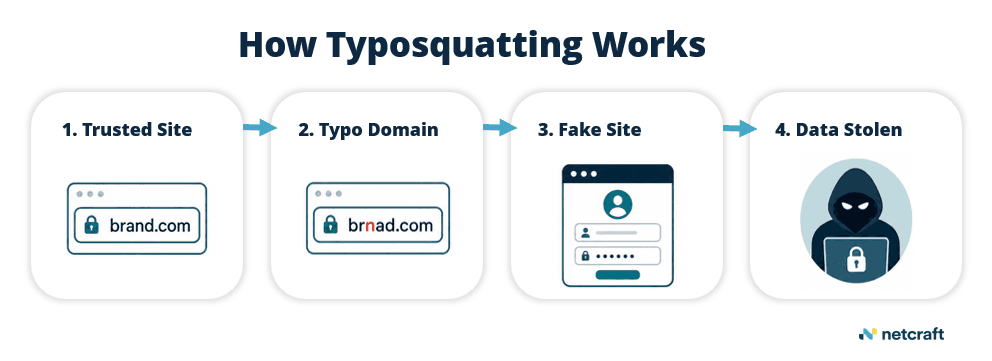
Common typosquatting techniques include:
Misspellings: using a common typo of a brand or domain name
Extra characters: adding a letter, number, or hyphen
Missing characters: removing one letter from the legitimate domain
Character substitution: replacing one letter with a similar-looking character
Different top-level domains: using .net, .co, .shop, or another extension instead of the legitimate one
Subdomain tricks: placing a brand name in a subdomain to make the URL look trustworthy
Homoglyphs: using characters from another alphabet that visually resemble trusted letters
Attackers may register these domains before launching a phishing site, or they may keep them dormant until they are ready to activate a campaign.
Typosquatting examples
These examples show how typosquatting can take different forms, from simple misspellings to homoglyphs and deceptive characters. In real campaigns, attackers often use many lookalike domains at once, spreading them across different TLDs, hosting providers, redirects, and phishing kits.
Typosquatting Approach | Typosquatted URL | Legitimate Brand/URL |
|---|---|---|
Misspelling | dubaicuctoms[.]com | Dubai Customs | dubaicustoms.gov.ae |
The domain changes customs to cuctoms, a subtle misspelling that a user could easily miss while skimming a URL. Netcraft found this domain impersonating Dubai Customs as part of an opportunistic fraud campaign using a fake parcel-tracking page and payment request.
Typosquatting Approach | Typosquatted URL | Legitimate Brand/URL |
|---|---|---|
Extra character | bookinggcomdubaflighttickets[.]webflow[.]io | Booking.com | booking.com |
The domain string uses bookingg with an extra “g” and combines the brand reference with travel-related terms to appear connected to Booking.com. Netcraft found this as part of a broader Booking.com impersonation campaign hosted on Webflow subdomains.
Typosquatting Approach | Typosquatted URL | Legitimate Brand/URL |
|---|---|---|
Homoglyph | rnastercard[.]de | MasterCard | mastercard.com |
The domain uses rn to visually mimic the letter m, making rnastercard look like mastercard at a quick glance. This is a homoglyph-style typosquatting technique that relies on how users visually process familiar brand names when scanning quickly. Netcraft identified this technique in active phishing campaigns targeting Mastercard, showing how even low-tech character substitutions can make fraudulent domains appear legitimate.
Typosquatting Approach | Typosquatted URL | Legitimate Brand/URL |
|---|---|---|
Homoglyph (deceptive separator) | sdu[.]edu[.]cnんcasんlogin[.]pass-sdu-edu[.]cn | Shandong University | sdu.edu.cn |
This example uses the Japanese hiragana character “ん” as a deceptive separator that can resemble a forward slash / at a quick glance. Netcraft found this technique being used in a wave of lookalike domains, where URLs were designed to make users visually read the string as a login path under sdu.edu.cn, even though the actual registered domain was pass-sdu-edu[.]cn.
Typosquatting vs. domain spoofing
Typosquatting and domain spoofing are related, but they are not exactly the same.
Typosquatting usually refers to lookalike or misspelled domains that are registered to mimic a trusted brand. The attacker relies on visual similarity or user error.
Domain spoofing is broader. It can include typosquatted domains, but it may also refer to deceptive sender identities, fake URLs, misleading subdomains, or other techniques that make an attacker-controlled asset appear connected to a legitimate organization.
In simple terms: typosquatting is one way attackers spoof or impersonate a trusted domain.
How to detect typosquatting at scale
Detecting typosquatting manually is difficult because attackers can generate thousands of lookalike variations from a single brand name. Effective typosquatting detection typically requires a brand protection solution that can continuously monitor domain activity, identify suspicious variations, and validate which domains pose a real threat.
Key capabilities to look for include:
Monitoring newly registered domains that resemble protected brands
Detecting misspellings, added characters, omitted letters, homoglyphs, and deceptive separators
Checking related infrastructure such as hosting, IP addresses, SSL certificates, and redirects
Identifying whether a domain is parked, dormant, suspicious, or actively malicious
Capturing screenshots and page content for evidence
Comparing pages against known brand assets and login flows
Prioritizing domains that are live, indexed, advertised, or connected to phishing infrastructure
Monitoring for reappearing domains after takedown
For organizations, typosquatting domains can turn small user mistakes into phishing, fraud, and brand impersonation risks. Detecting typosquatting at scale helps organizations find these deceptive domains before they are used to mislead customers, capture credentials, or damage trust.