
10 Real Examples of Phishing Websites (and How to Spot Them)



Key Takeaways
Modern phishing websites are tough to visually detect, as they often closely resemble the legitimate organizations they impersonate.
Netcraft researchers identified the examples in this article during investigations into real-world phishing campaigns.
Common targets include streaming services, banks, delivery providers, travel companies, and government agencies.
While warning signs exist, some phishing websites are so convincing that the domain name may be the only obvious clue.
Table of Contents
Phishing websites have become increasingly sophisticated. Modern phishing kits can replicate a legitimate organization's branding, layout, and user experience so accurately that even security-conscious users can struggle to tell the difference.
The examples in this article were identified by Netcraft researchers during investigations into real-world phishing campaigns targeting consumers, businesses, financial institutions, government services, and online platforms. Each example shows how attackers impersonate trusted organizations to steal credentials, payment information, or personal data.
Many people assume phishing websites are easy to spot because they contain obvious spelling mistakes or poor design. In reality, some of the phishing sites investigated by Netcraft are nearly indistinguishable from the legitimate websites they imitate. In some cases, the only visible clue is the domain name itself.
The following examples provide a closer look at real phishing websites discovered in the wild, the organizations they impersonated, and the warning signs that may help users identify fraudulent sites before becoming victims.
Real Phishing Website Examples at-a-Glance
Example | Phishing Lure | Detection Difficulty | Key Warning Sign |
|---|---|---|---|
Account login or payment update | High | URL is not owned by Netflix | |
Reservation confirmation request | High | Requests payment through an unfamiliar website | |
Security verification prompt | Very High | Unusual instructions that differ from Google's normal verification process | |
Account login | Very High | Hosted on a non-Instagram domain | |
Account suspension or login request | High | URL does not belong to SendGrid | |
Failed parcel delivery notification | Moderate | Requests payment or personal information to release a package | |
Delivery issue notification | Moderate | Tracking page hosted outside USPS domains | |
Government payment or parking fine notification | High | Requests financial information through an unofficial website | |
Account verification or login request | Very High | Domain differs from Kuda's legitimate website | |
Failed package delivery notification | Moderate | Uses urgency and an unofficial domain |
From fake login pages and banking portals to fraudulent delivery notifications and government payment sites, these examples illustrate some of the most common phishing tactics observed by Netcraft researchers. Each example includes the organization impersonated, the attacker's objective, and potential warning signs that may help users identify a fraudulent website.
1. Fake Netflix Login Pages Designed to Steal Credentials
This phishing website mimics Netflix's login experience and prompts visitors to enter their account credentials. The page uses familiar branding and design elements to create a false sense of legitimacy.
Brand Impersonated
Netflix
How to Spot the Phishing Site
The URL does not belong to Netflix.
The page may be hosted on a free web hosting service or unrelated domain.
The website requests credentials outside Netflix's official domain.
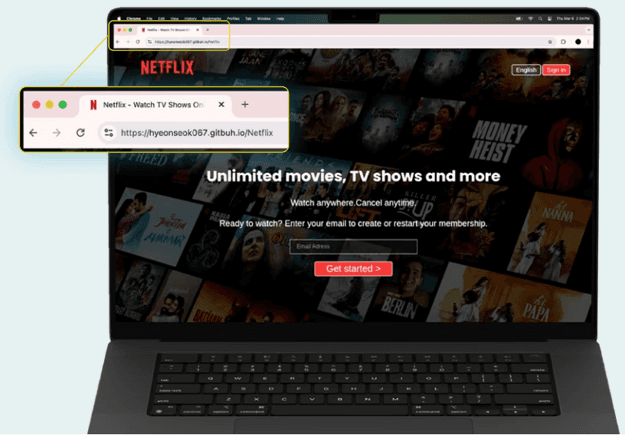
Figure 1. A phishing website impersonating Netflix's login page and designed to steal user credentials.
Why This Example Matters
The phishing page closely resembles Netflix's legitimate login screen, demonstrating how attackers rely on brand familiarity to encourage users to hand over account credentials.
2. Fake Booking.com Reservation Pages Designed to Steal Payment Information
Attackers created phishing pages that imitate Booking.com's reservation and payment workflows. These sites are often distributed through phishing emails claiming a booking requires confirmation or additional payment verification.
Brand Impersonated
Booking.com
How to Spot the Phishing Site
The website asks for payment information through an unfamiliar URL.
The domain does not belong to Booking.com.
The message creates urgency around reservation cancellation or payment verification.

Figure 2. A phishing page impersonating Booking.com and prompting users to confirm reservation details and payment information.
Why This Example Matters
Travel-related phishing campaigns are particularly effective because many recipients are actively expecting booking confirmations, making the request appear legitimate.
Read the full analysis: Thousands of Domains Target Hotel Guests in Massive Phishing Campaign
3. Fake Google Verification Pages Distributed Through SEO Poisoning
This phishing page imitates Google's verification process and is designed to trick users into completing unusual verification steps that ultimately compromise their devices or accounts.
Brand Impersonated
How to Spot the Phishing Site
Unusual verification instructions, such as copying commands or pressing keyboard shortcuts.
Requests that differ from Google's standard login or CAPTCHA process.
The page is hosted outside Google's official domains.

Figure 3. Search results used in an SEO poisoning campaign, where attackers attempt to position phishing pages alongside legitimate Google business services.
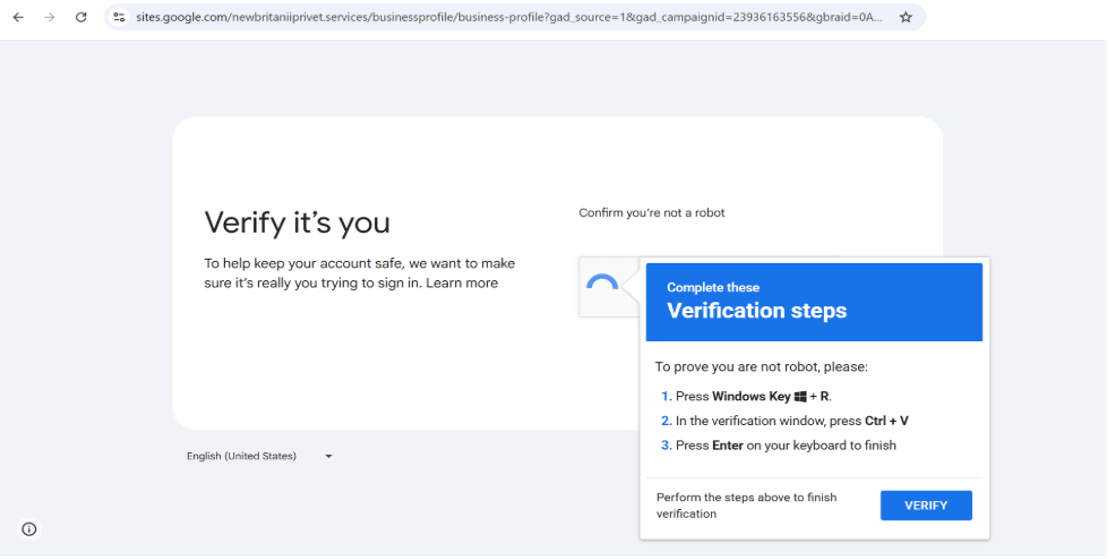
Figure 4. A fraudulent verification page that tells users to press Windows+R, paste clipboard contents, and press Enter; actions that may execute attacker-controlled commands on the victim's device.
Why This Example Matters
Unlike traditional phishing pages that simply request credentials, this campaign used deceptive verification instructions, including prompts to paste content from the clipboard, to manipulate users into performing attacker-directed actions on their own devices.
4. Fake Instagram Login Pages That Look Nearly Identical to the Real Thing
This phishing page recreates Instagram's login screen with remarkable accuracy. The goal is to collect usernames and passwords that can later be used to hijack accounts.
Brand Impersonated
How to Spot the Phishing Site
The login page is hosted on a domain unrelated to Instagram.
The site lacks expected account recovery or security features.
Unexpected redirects occur after login attempts.

Figure 5. A phishing website designed to replicate Instagram's login experience and capture usernames and passwords.
Why This Example Matters
The visual differences between the phishing page and Instagram's legitimate login page are minimal, highlighting how difficult modern phishing websites can be to identify based on appearance alone.
Read the full analysis: For Education Purposes Only? When Web Design Lessons Teach Phishing
5. Fake SendGrid Login Pages Designed to Capture Credentials
Attackers created phishing pages that copied SendGrid's login experience to steal credentials from email administrators and business users.
Brand Impersonated
SendGrid
How to Spot the Phishing Site
The URL does not belong to SendGrid.
The login workflow may be simplified compared to the legitimate experience.
Security features expected on the authentic platform may be missing.
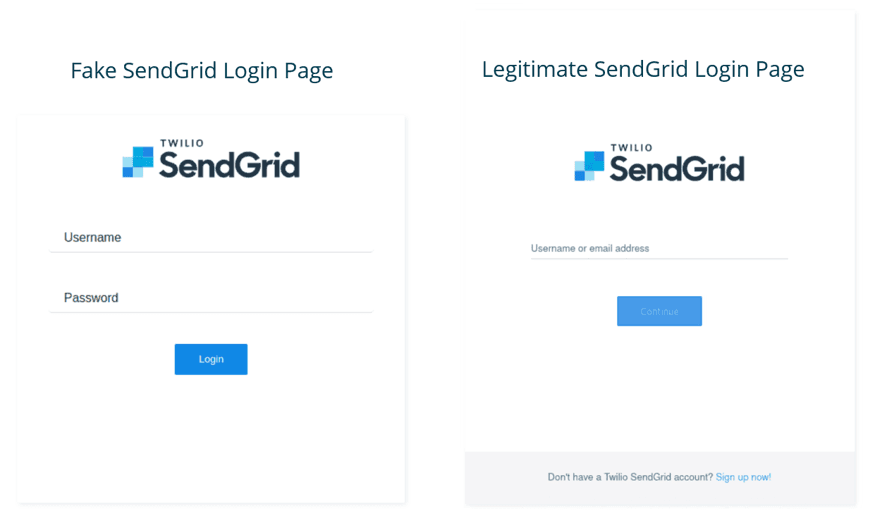
Figure 6. A side-by-side comparison of a fraudulent SendGrid login page created to harvest credentials from email platform users and the legitimate brand-owned login page.
Why This Example Matters
The phishing page closely resembled the authentic SendGrid login page, making it difficult to distinguish without inspecting the URL.
Read the full analysis: Phishception – SendGrid is abused to host phishing attacks impersonating itself
6. Fake Evri Delivery Pages Used to Steal Personal Information
This phishing website claims a parcel delivery has failed and instructs recipients to update their information to receive their package.
Brand Impersonated
Evri
How to Spot the Phishing Site
The page requests personal or payment information to complete delivery.
The delivery notification creates unnecessary urgency.
The website is hosted on a domain unrelated to Evri.

Figure 7. A phishing page impersonating Evri and claiming a package cannot be delivered until the recipient updates their information.
Why This Example Matters
The page reproduces Evri branding and delivery messaging, making it highly convincing to users awaiting shipments. Package delivery scams are highly effective because many people are expecting legitimate shipments and may react without carefully examining the website.
Read the full analysis: Every Doggo Has Its Day: Unleashing the Xiū Gǒu Phishing Kit
7. Fake USPS Tracking Pages Designed to Steal Personal Information
This phishing page imitates USPS package tracking and claims there is a problem with the recipient's delivery address.
Organization Impersonated
United States Postal Service (USPS)
How to Spot the Phishing Site
The page requests personal information before releasing a package.
Users are pressured to act immediately to avoid delivery issues.
The URL does not belong to USPS.

Figure 8. A fraudulent USPS tracking page designed to collect personal and payment information from package recipients.
Why This Example Matters
Because package notifications are common, victims may not question requests that appear to relate to expected deliveries.
Read the full analysis: Every Doggo Has Its Day: Unleashing the Xiū Gǒu Phishing Kit
8. Fake GOV.UK Pages Used to Collect Financial Information
These phishing pages imitate official GOV.UK services, including cost-of-living assistance programs and parking fine payment portals, to collect personal and financial information.
Organization Impersonated
UK Government
How to Spot the Phishing Site
The page references government programs that may not exist.
Users are asked to provide payment card information to receive government funds.
The website is not hosted on an official GOV.UK domain.

Figure 9. A phishing website impersonating GOV.UK and promoting a fictitious government payment program to collect victim information.
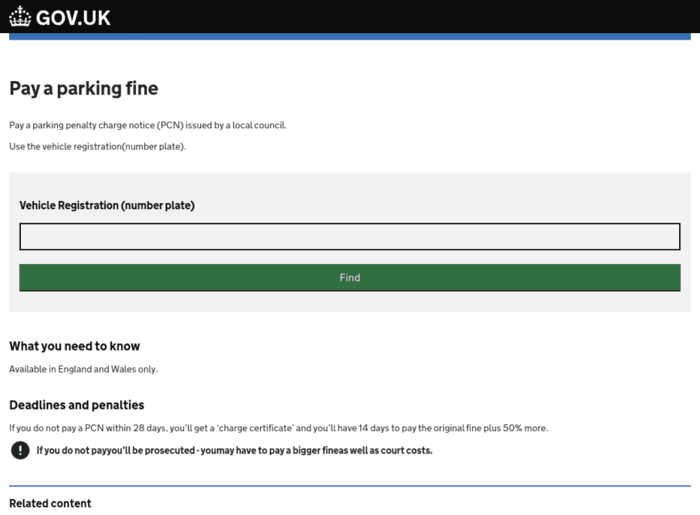
Figure 10. The first stage of a GOV.UK parking fine phishing scam, where victims are prompted to enter vehicle details before progressing to a fraudulent payment page.
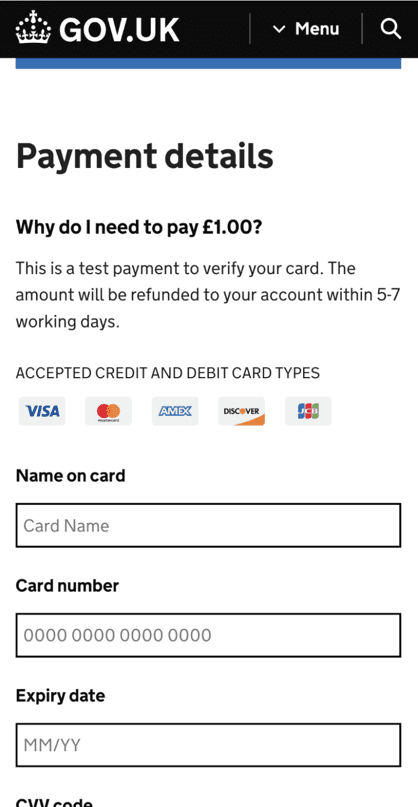
Figure 11. Fake form mimicking GOV.UK where victims are prompted to enter financial details.
Why This Example Matters
The pages replicate GOV.UK branding with remarkable accuracy. Government websites are highly trusted by the public, making them attractive targets for phishing campaigns designed to exploit that trust.
Read the full analysis: Every Doggo Has Its Day: Unleashing the Xiū Gǒu Phishing Kit
9. Fake Kuda Banking Pages Created by Phishing-as-a-Service Operators
This phishing page impersonates Kuda, a digital banking platform, and is part of a broader phishing-as-a-service ecosystem that enables cybercriminals to launch attacks at scale.
Brand Impersonated
Kuda
How to Spot the Phishing Site
The URL differs from Kuda's legitimate domain.
Users are prompted to enter banking credentials through unfamiliar pages.
The website may contain slight domain modifications or additional words.
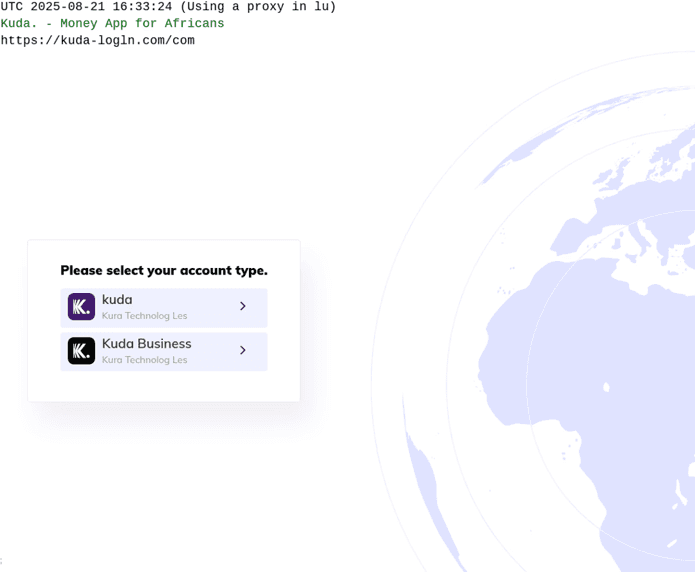
Figure 12. A phishing website impersonating digital bank Kuda as part of a phishing-as-a-service operation.
Why This Example Matters
The example demonstrates how phishing-as-a-service platforms enable attackers to rapidly create convincing banking phishing pages that closely resemble legitimate services.
Read the full analysis: Inside the Lighthouse and Lucid PhaaS Campaigns Targeting 316 Global Brands
10. Fake Posta Shqiptare Delivery Pages Targeting Package Recipients
This phishing website imitates Albania's national postal service and claims a package cannot be delivered until the recipient updates their information.
Organization Impersonated
Posta Shqiptare, the national postal service of Albania
How to Spot the Phishing Site
The website requests personal or payment information to resolve a delivery issue.
The domain name differs from the legitimate postal service.
The page uses urgency to encourage immediate action.

Figure 13. A phishing page impersonating Albania's national postal service, Posta Shqiptare, and requesting information to resolve a supposed delivery issue.
Why This Example Matters
Postal-service impersonation remains one of the most common phishing techniques because it exploits routine online shopping and package tracking behavior.
Read the full analysis: Inside the Lighthouse and Lucid PhaaS Campaigns Targeting 316 Global Brands
What These Examples Reveal About Modern Phishing
The phishing websites featured in this article target organizations across multiple industries, but they reveal a consistent pattern: attackers increasingly rely on realistic branding, trusted services, and familiar user experiences rather than obvious deception.
For defenders, this means phishing is no longer just a user-awareness challenge. Organizations must be able to identify, monitor, and disrupt phishing infrastructure before fraudulent websites can reach customers, employees, and partners.
The examples shown here represent only a small sample of the phishing activity investigated by Netcraft researchers. As attackers continue to evolve their techniques, understanding how phishing websites operate remains an important step toward reducing risk and protecting users online.
What Should I Do If I Suspect a Website Is a Phishing Site?
If you encounter a website that appears suspicious, avoid entering any credentials, payment information, or personal data until you've verified the site's legitimacy.
Here are a few steps you can take:
Check the site's reputation. Use Netcraft's free Site Report tool to review information about a website, including hosting details, reputation data, and potential security concerns: https://sitereport.netcraft.com/
Report suspected phishing websites. If you believe a website is being used for phishing or fraud, submit it to Netcraft's reporting service: https://report.netcraft.com/report
Install browser-based phishing protection. The free Netcraft Extension provides protection against known phishing websites and malicious JavaScript while browsing. It also allows you to quickly look up information about the websites you visit.
Verify independently. If a website claims to represent a bank, retailer, government agency, or online service, navigate directly to the organization's official website rather than clicking links in emails, text messages, advertisements, or social media posts.
Even if a website looks legitimate, it's worth taking a moment to verify before entering sensitive information.
What Should I Do If I Find a Phishing Site Impersonating My Brand?
Organizations are often alerted to phishing attacks by customers, employees, or partners who encounter fraudulent websites impersonating their brand. Unfortunately, by the time reports start arriving, attackers may already have launched multiple phishing sites targeting victims.
If your organization discovers phishing websites impersonating your brand:
Document the phishing site and preserve evidence, including screenshots, URLs, and any related emails or messages.
Report the site immediately so takedown efforts can begin as quickly as possible: https://report.netcraft.com/report
Warn customers and employees about the threat, particularly if credentials or payment information may be at risk.
Monitor for additional phishing infrastructure. Attackers frequently register multiple domains and launch new phishing websites after existing ones are removed.
Review potential brand abuse activity across domains, websites, and online channels to determine whether the phishing site is part of a broader campaign.
Netcraft helps organizations identify, monitor, block, and disrupt phishing attacks targeting their brands. Through continuous monitoring, threat intelligence, phishing site detection, and takedown services, organizations can gain visibility into fraudulent websites that may otherwise go unnoticed and reduce the risk to customers, employees, and partners.
If your organization is concerned about phishing sites impersonating your brand, learn more about Netcraft's phishing detection, monitoring, and takedown capabilities.
Frequently Asked Questions About Phishing Websites
What is a phishing website?
A phishing website is a fraudulent website designed to impersonate a trusted organization and trick users into providing credentials, payment information, or personal data.
How can I tell if a website is phishing?
Check the domain name carefully, avoid clicking links from unsolicited messages, and verify requests directly through the organization's official website. However, some phishing websites are sophisticated enough that visual inspection alone may not reveal the deception.
Can phishing websites use HTTPS?
Yes. HTTPS only encrypts communication between your browser and the website. It does not verify that the website is legitimate.
What should I do if I enter information into a phishing website?
Immediately change affected passwords, enable multi-factor authentication, notify impacted organizations, and monitor financial accounts for suspicious activity.


